
QuickBooks Laser Cheques Canada — CPA-Compliant. 25% More Free. Works at Your Bank.
Fully compatible laser cheques for QuickBooks Online, Desktop Pro, Premier, and Enterprise — all Canadian versions. CPA Self-Accredited Manufacturer (#1010). Free PDF proof. Same-day printing available.
✔ Risk-free: Error on our part? We reprint & reship free. | ✔ No hidden fees

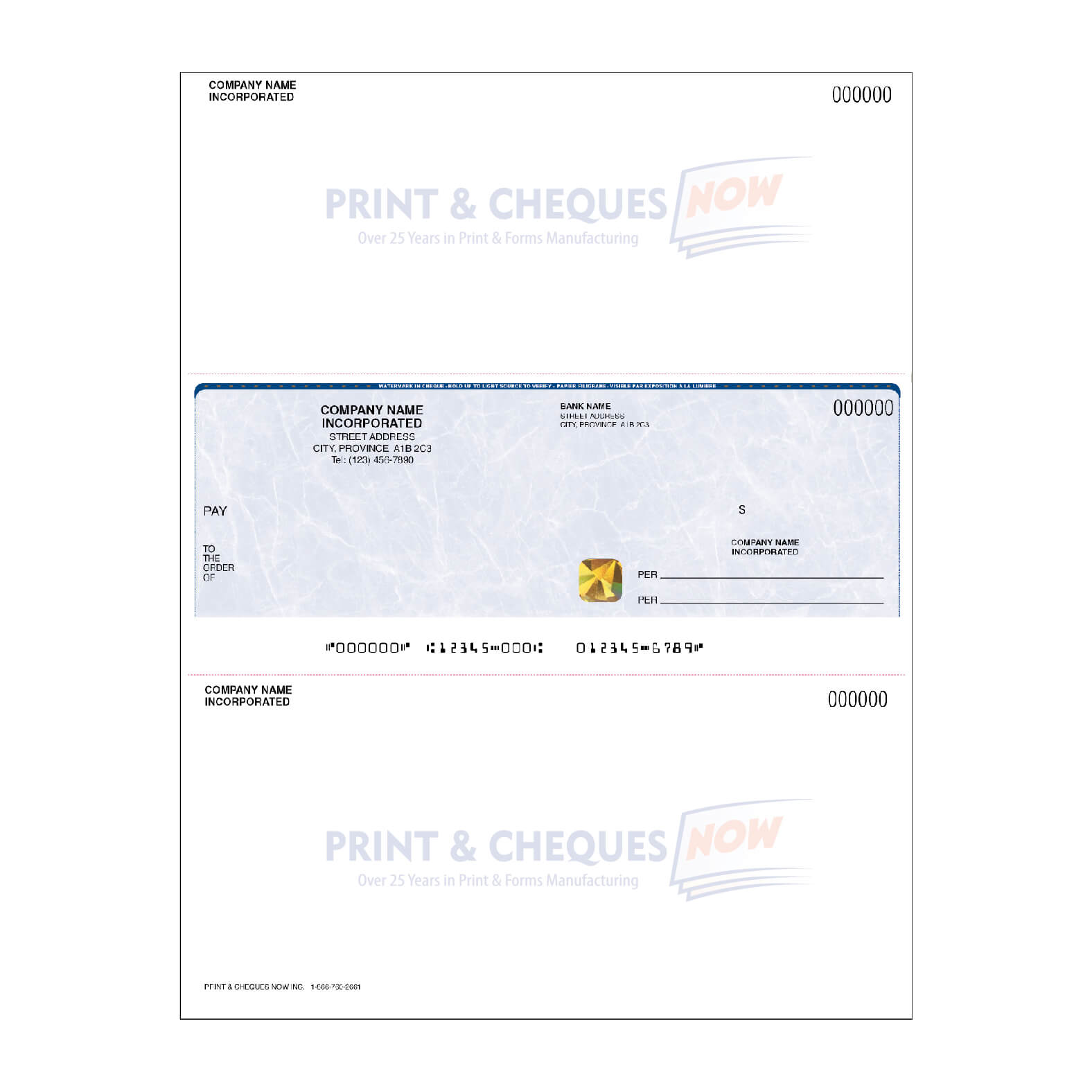
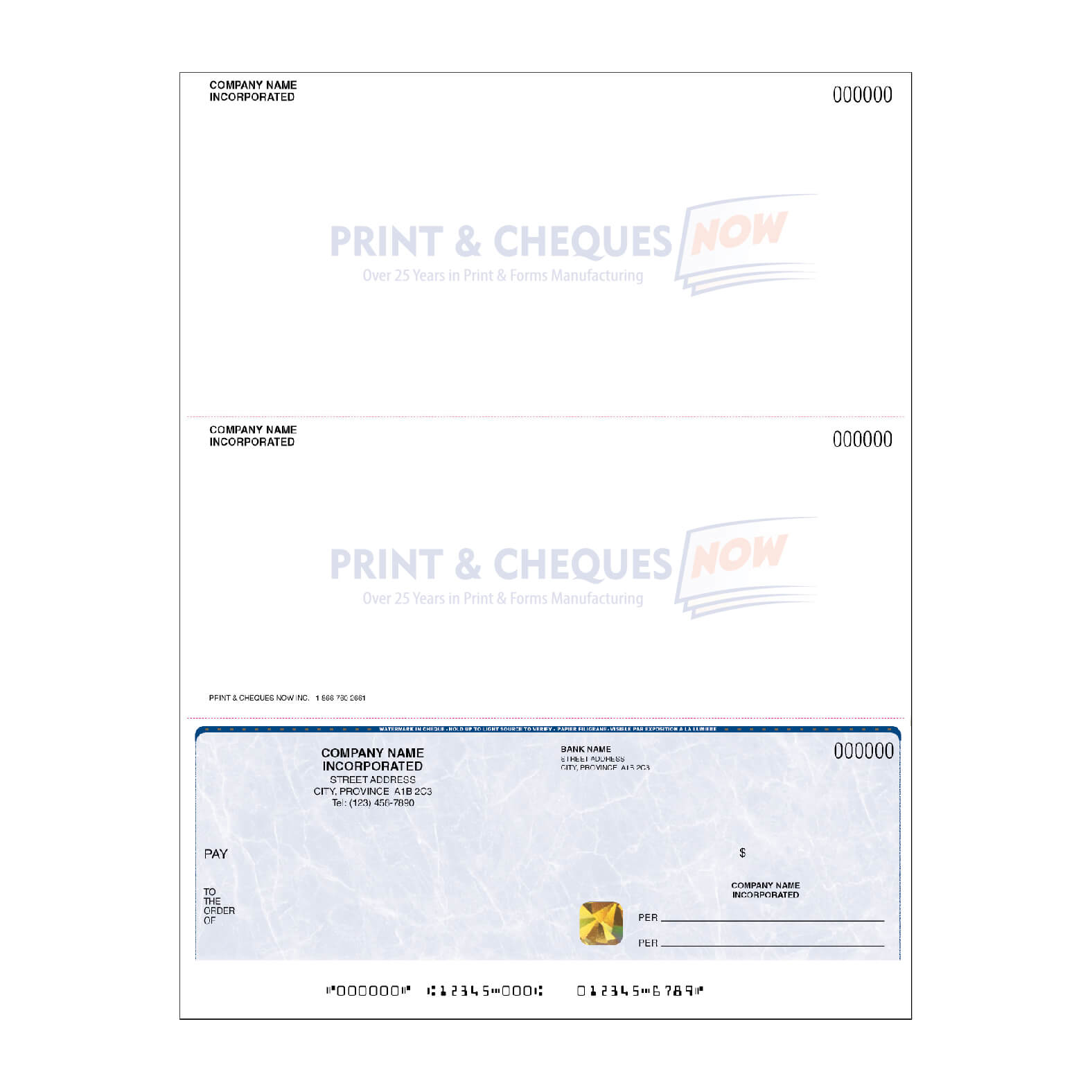
Why Canadian QuickBooks Users Switch from Intuit to ChequesNow
Intuit's Cheque Vendor Lock-In — And the Alternative Most QB Users Don't Know Exists
Intuit has built an ecosystem where QuickBooks users default to ordering cheques through the product itself. If you click "Order Cheques" inside QuickBooks Online, you land on Intuit's affiliated cheque ordering portal. If you're on QuickBooks Desktop, the Help guide points to the same vendor programme. Intuit earns a referral margin on every cheque order from its user base — and the cheque quality, speed, and security features reflect a product designed to be profitable for the middleman, not optimized for you.
QuickBooks Desktop users ordering computer cheques (also called voucher cheques, or laser checks in US QuickBooks documentation) often pay significantly more than necessary for standard stock with fewer security features included as standard. QuickBooks Online users face the same issue: Intuit's affiliated portal charges a premium that thousands of Canadian businesses avoid entirely by ordering direct from a CPA-accredited manufacturer.
Print & Cheques Now prints QuickBooks-compatible laser cheques in-house as CPA Self-Accredited Printer #1010. No Intuit portal. No referral margin passed to you. We match your exact QuickBooks cheque position — top stub, middle stub, or bottom stub — confirmed with a free PDF proof before we print a single cheque. Your QuickBooks print workflow remains identical: you load different cheque stock, nothing changes in the software. 25% more cheques free. Gold hologram foil included at no extra cost on every preprinted order.
| Feature | Intuit / QuickBooks | Your Bank (via D&H) | ✅ Print & Cheques Now |
|---|---|---|---|
| 250 cheques comparison | Intuit standard rate (no hologram) | Bank standard rate | Same price range — but 325 cheques + hologram included |
| Gold Hologram Security | ❌ Not included | ❌ Not included | ✅ Free on every order |
| Heat-Sensitive Ink | ❌ Not included | ❌ Not included | ✅ Free on every order |
| Free PDF Proof | ❌ No | ❌ No | ✅ Yes — every order |
| Same-Day Rush Printing | ❌ Not available | ❌ Not available | ✅ Order by 2 PM EST |
| Works-At-Your-Bank Guarantee | ❌ None | ❌ None | ✅ Bank rejects? We reprint free |
| In-House Manufacturing | ❌ Outsourced (D&H) | ❌ Outsourced (D&H) | ✅ CPA Printer #1010 |
| BBB Rating | Varies | Varies | ✅ A+ Accredited |
| 25% More Cheques Free | ❌ No | ❌ No | ✅ Every order |
Are Our Laser Cheques Compatible with QuickBooks?
Yes — 100% compatible with all Canadian QuickBooks editions. Manufactured to CPA Standard 006 and pre-aligned to the cheque-on-top, cheque-in-middle, and cheque-on-bottom print templates used by QuickBooks.
Works-At-Your-Bank Guarantee
If your Canadian bank rejects a QuickBooks cheque for any reason related to our printing, Print & Cheques Now reprints your entire order free — covering RBC, TD, BMO, CIBC, Scotiabank, ATB Financial, Desjardins, and all major Canadian credit unions.
Compatible QuickBooks Editions
- QuickBooks Online — Simple Start, Essentials, Plus, Advanced
- QuickBooks Online Payroll (all tiers)
- QuickBooks Desktop Pro (all years 2018–2026)
- QuickBooks Desktop Premier (all editions)
- QuickBooks Desktop Enterprise (all versions)
- QuickBooks for Mac
- Intuit (general brand — all products)
Compatible Cheque Positions
Cheque-on-top, cheque-in-middle, and cheque-on-bottom — all positions compatible. Matches QuickBooks Online and Desktop print templates exactly.
Works at All Major Canadian Banks
- Royal Bank of Canada (RBC)
- TD Canada Trust
- BMO
- CIBC · Scotiabank
- ATB Financial · Desjardins
- Tangerine · Simplii · EQ Bank
- All Canadian credit unions
QuickBooks Laser Cheques — Order Direct from the Manufacturer
Same CPA-compliant quality as your bank — at up to 60% less. 25% more cheques free and gold hologram security included on every preprinted order.
🖨️ QuickBooks Laser Cheques — Preprinted
We print your company & bank details. Load and print from QuickBooks.
- ✅ Gold hologram foil + heat-sensitive ink included
- ✅ Free PDF proof — approve before we print
- ✅ Works-At-Your-Bank Guarantee
- ✅ CPA Printer #1010 — bank acceptance guaranteed
⚙️ Blank Laser Cheque Stock
MICR-ready blank stock — print everything in-house using QuickBooks's print module.
- ✅ MICR-ready blank stock
- ✅ True watermark security paper
- ⚠️ Gold hologram + heat-sensitive ink NOT included on blank stock
- 💡 Ask us about MICR Toner — call 1-866-760-2661
What You Get — 25% More Cheques FREE
| Order Size | Your Bank / Vendor | ✅ Print & Cheques Now |
|---|---|---|
| Small | 100 cheques | 125 cheques + proof + hologram |
| Standard | 250 cheques | 325 cheques + proof + hologram |
| Medium | 500 cheques | 625 cheques + proof + hologram |
| Large | 1,000 cheques | 1,250 cheques + proof + hologram |
| Volume | 2,000 cheques | 2,500 cheques + proof + hologram |
Visit the order page for current pricing. No hidden fees.
Bank-Grade Security Included at No Extra Cost
Every QuickBooks laser cheque from Print & Cheques Now includes four premium security features at no additional cost.
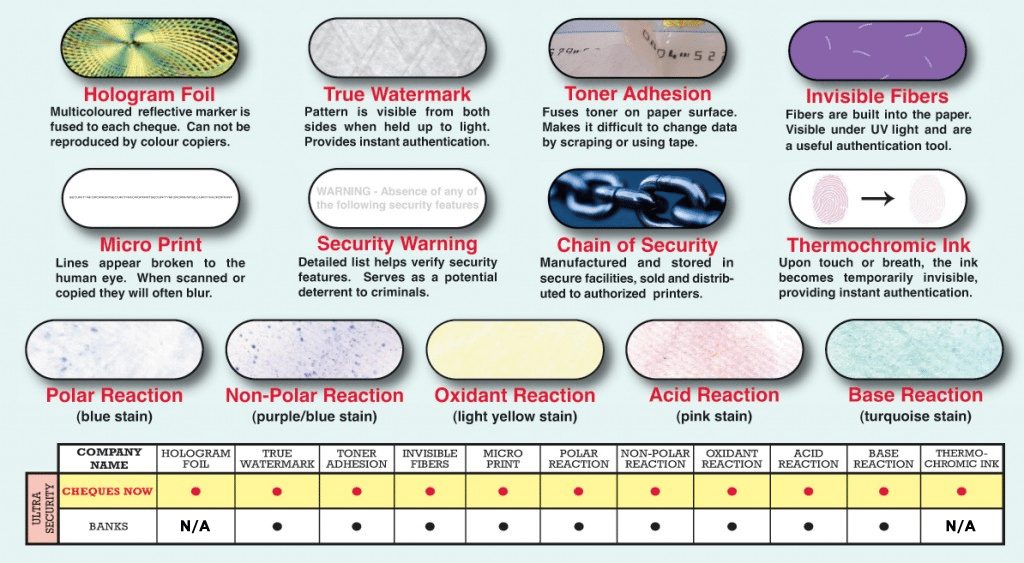
Gold Hologram Foil
Impossible to copy on any scanner or printer. Included free on every preprinted laser order.
Heat-Sensitive Ink
Changes colour when touched — detecting chemical or heat alteration. Included free on preprinted laser.
Watermark Paper
Embedded in paper fibres. Visible under light, impossible to photocopy. UV fibres and chemical sensitivity.
Toner Adhesion & MICR
Prevents washing or scraping. MICR ink clears all Canadian bank processing on the first pass.
Gold Hologram and Heat-Sensitive Ink apply to preprinted laser cheques only. Blank laser stock includes watermark paper and MICR-ready stock. See all security features →
Tired of Overpaying for QuickBooks Cheques Through Davis & Henderson?
Whether you order through Intuit or your bank, there is a strong chance Davis & Henderson (D&H) is fulfilling your cheques behind the scenes — and passing a middleman markup to you.
Print & Cheques Now prints QuickBooks cheques in-house as CPA Self-Accredited Printer #1010. No D&H. No middleman. No markup. Same CPA-compliant quality — with 25% more cheques free, gold hologram included, and a free PDF proof before we print anything.
Step-by-Step: Setting Up QuickBooks to Print CPA-Compliant Cheques
Switch your QuickBooks cheque printing to Print & Cheques Now — your existing workflow requires no changes.
QuickBooks Desktop note: QuickBooks Desktop Pro, Premier, and Enterprise use different default printer setups. If you're on QuickBooks Desktop and printing to a dedicated MICR printer (rather than a standard laser printer), call 1-866-760-2661 — we confirm MICR printer compatibility and recommend the correct blank laser stock for your setup.
Set up your QuickBooks company for CPA-compliant laser cheque printing
In QuickBooks Online: go to Settings (gear icon) → Chart of Accounts and confirm your Canadian bank account is connected with the correct transit number, institution number, and account number. Your MICR line will be encoded from these details. For QuickBooks Online, go to Settings → Custom Form Styles → Cheques to identify your current cheque print position (cheque-on-top, cheque-in-middle, or cheque-on-bottom). For QuickBooks Desktop: go to Lists → Chart of Accounts → select your bank account → Edit Account to confirm your banking details. Note: QuickBooks Desktop stores bank details differently than QuickBooks Online — upload a void cheque from your QB bank account during your order to ensure your banking details match exactly.
Confirm your QuickBooks edition and cheque template format
Each QuickBooks edition uses slightly different default cheque templates. QuickBooks Online (all Canadian plans) defaults to a voucher cheque with the cheque at top and two stub sections below. QuickBooks Desktop Pro and Premier default to a standard cheque-on-top format. QuickBooks Desktop Enterprise may have customized cheque templates if your Enterprise implementation configured custom forms. To confirm your template: in QuickBooks Desktop, go to File → Printer Setup → Form Name: Cheque/Pay Cheque → Options. In QuickBooks Online, print a test cheque from Banking → Write Cheques to generate a sample PDF that you can upload with your order.
Place your order specifying your QuickBooks version and format
On our order form, select QuickBooks as your software. Specify your exact edition (Online, Desktop Pro, Premier, Enterprise, or Mac). Select your cheque position. Upload a test print or void cheque from your QuickBooks company — this is how we confirm your exact layout, not the edition you've selected. Enter your company name (exactly as entered in QuickBooks Company Settings), banking details, quantity, and background colour preference (10 options available). For QuickBooks Desktop Enterprise users with customized cheque forms: note the custom form name you're using so we can confirm compatibility.
Approve your QuickBooks PDF proof — key details to verify
We email your proof before printing. For QuickBooks orders specifically, verify: (1) the MICR line sequence matches your QB bank account details — for Canadian bank accounts, confirm the sequence is MICR account number, institution number + transit number, cheque number (left to right), (2) the stub position matches your QuickBooks print format, (3) your company name and address match your QuickBooks Company Settings exactly. For QuickBooks Desktop Enterprise users: if the proof shows standard format but your Enterprise uses a custom template, call 1-866-760-2661 before approving so we can adjust.
Load cheques and print from QuickBooks — first run verification
Load your cheques into your laser printer tray in the position shown in your proof. In QuickBooks Online: Banking → Write Cheques or Pay Bills → Print Cheques. In QuickBooks Desktop: Banking → Write Cheques or Employees → Pay Employees → Print Cheques. Run a test print on plain paper first for your first order — overlay it on a blank cheque sheet to confirm alignment before printing on your actual stock. Once confirmed, print your production batch. Your Works-At-Your-Bank Guarantee covers every cheque. Your QuickBooks format is saved in our system — reordering typically takes under 2 minutes.
Trusted by 46,000+ Canadian Businesses
★ 4.9/5 across 800+ verified Google reviews. CPA Self-Accredited Printer #1010 since 2006. In-house printing. Canadian-owned and family-run.
"We used to order QuickBooks cheques through Intuit every year. After switching to Print & Cheques Now we get 25% more cheques, a free proof before printing, and gold hologram security included. The layout matched our existing QB template perfectly on the first order."— Bookkeeper, Accounting Firm, Ontario
"I was skeptical about ordering QB cheques outside of Intuit. The free proof process convinced me — I could see exactly how they would print before committing. Cleared at TD without any issues and the savings are real."— Office Manager, Professional Services, Alberta
Canadian-Owned. Family-Run. In-House Since 2006.
Every QuickBooks cheque order is printed by our team — not outsourced to D&H. CPA #1010. BBB A+ ↗. 46,000+ businesses. 800+ reviews at 4.9/5.
Frequently Asked Questions — QuickBooks Cheques
What are QuickBooks laser cheques — also called computer cheques or voucher cheques?
QuickBooks laser cheques — also called computer cheques, voucher cheques, or laser checks — are CPA-compliant cheques formatted for laser printer printing from QuickBooks. They come in cheque-on-top, cheque-in-middle, and cheque-on-bottom positions to match QuickBooks print templates. Print & Cheques Now manufactures 100% compatible QuickBooks computer cheques as CPA Self-Accredited Printer #1010.
Are these cheques compatible with the latest QuickBooks Online update?
Yes — Print & Cheques Now QuickBooks cheques are fully compatible with the latest QuickBooks Online update and all Canadian editions. Manufactured to CPA Standard 006 and aligned to the standard QuickBooks voucher cheque template. As CPA Self-Accredited Printer #1010, our cheques work at every major Canadian bank without additional testing.
How much can I save versus ordering QuickBooks cheques through Intuit?
Most Canadian QuickBooks users save 25–60% by ordering from Print & Cheques Now versus through Intuit. Where Intuit charges approximately the Intuit portal rate for 250 basic voucher cheques with no hologram foil, Print & Cheques Now gives you 325 QuickBooks cheques with gold hologram foil and thermochromic ink included — 75 more cheques and better fraud protection.
Do you provide a free PDF proof before printing my QuickBooks cheques?
Yes — every Print & Cheques Now order includes a free PDF proof emailed before we print anything. You verify the layout matches your QuickBooks print template exactly before approving. Proofs are typically sent within a few hours of order placement at no extra charge.
What is the shipping time for QuickBooks cheques?
Print & Cheques Now ships Canada-wide from Calgary, Alberta. Rush orders approved before 2 PM EST are printed the same business day and ship via air courier for next-day delivery to most Canadian cities. Standard delivery takes 2–5 business days. Call 1-866-760-2661 for rush availability.
Also Compatible With These Accounting Platforms
All 195+ programs in our hub use the same CPA-compliant laser cheque stock — 25% more free on every order.
Order QuickBooks Cheques — Same-Day Printing & Next-Day Delivery Available
CPA Printer #1010 since 2006. In-house printing. Free PDF proof. 25% more cheques free. Accepted at every Canadian bank — guaranteed.
Cheques comply with Canadian Payment Standards (Payments Canada) ↗ — CPA Self-Accredited Printer #1010.
Trademark & Affiliation Notices:
Davis & Henderson / D+H / Finastra: Independent company — not affiliated with, endorsed by, or sponsored by Finastra, D+H, or Davis + Henderson. References are for factual and comparative purposes only.
QuickBooks is a trademark of Intuit Inc. Print & Cheques Now Inc. is not affiliated with, endorsed by, or sponsored by Intuit Inc. All software names referenced are trademarks of their respective owners. Print & Cheques Now Inc. is not affiliated with or sponsored by any software company referenced. Mentions indicate product compatibility only.